The Home Depot
Giving merchant planners their jobs back
Merchant planners were hired to shape what The Home Depot sells. Instead they spent their days on maintenance across a dozen fragile tools. myAssortment gave them one place to put the right product in the right store.
Merchant planners work for a merchant, deciding which products every store carries and keeping those assortments running through resets, events and last-minute requests.
The problem
- 01
Hired for strategy, stuck in maintenance
Planners joined to build assortments with their merchants. Most of their day went to fixing errors, chasing stores and emailing partners.
- 02
A dozen tools that don’t talk
Setup apps, trackers and spreadsheets each held part of the truth, and their data rarely agreed.
- 03
Product with no place to live
Inventory worth hundreds of millions of dollars sat misplaced or overlooked in stores.
My role
Designed
myAssortment
- Dashboard
- Assortment views
- Product status changes
- Status cart and checkout
- Add and drop
Research
- User interviews
- Observational studies
- Persona
- Journey map
- Vision workshops
- Design studios
Led
- Ran vision workshops and weekly design studios with planners on our campus.
- Mapped how a product moves into and out of stores, and ranked every status change.
- Told the story to leadership to show what the app was worth.
What planners told us
- “I’m always on edge, worrying I’ll mess up using these tools for my maintenance tasks. One mistake and it could cost the company millions!”
- “I’m swamped with communicating and handling maintenance tasks all the time! It’s leaving me with no time to strategically manage my assortments.”
- “I really don’t have a clear picture of what products we’re selling in our stores. It’s a bit of a struggle.”
- “The tasks I’m handling now are nothing like what I was told I’d be doing when I was hired.”
What it cost the business
- Inventory worth hundreds of millions of dollars was misplaced or overlooked in stores.
- Too many low-velocity SKUs were clogging inventory management.
- Merchants couldn’t build the right assortments without more help from their planners.
- Managing assortments took far too long.
The tools behind one job
- SKUSKU Setup
- CSKClone SKUs
- X560s
- X531s
- XVendor RCW
- DWDirect Write
- AMTAMT
- AMTAMT 2.0
- PProject trackers
- MLMerch Logix
- DmyDrill
11 tools and spreadsheets → one myAssortment
Where a planner’s week went
Proportions are illustrative, from surveys, analytics and interviews.
Decisions that mattered
01Map the product’s journey first
Swapping one air compressor for its new model passed through a merchant, a planner, a vendor, a space planner and the store team, across setup apps, spreadsheets and email. Mapping it showed exactly where the work broke down.
Swapping one SKU: the 2019 air compressor for the 2020 model
- 10 steps
- 5 people
- 5 handoffs
- 1Merchant“Swap in the new model.” Asks to replace the 2019 air compressor with the 2020 model.
- 2Merchant planner“Who do I tell?” Tells the team about the change. Overwhelmed Handoff from Merchant
- 3Vendor“Okay, let’s do it.” Onboards the new UPC. Busy; planner blocked Handoff from Merchant planner
- 4Merchant planner“This is a new UPC!” Creates the SKU in the SKU setup app. Redundant Handoff from Vendor
- 5Merchant planner“What do I do with the old SKU?” Sets it to clearance or a rolling change, per the merchant’s exit plan. Shrewd but inefficient
- 6Merchant planner“Let’s turn the new SKU on!” Runs SKU maintenance and sets it to active. Fine, for now
- 7Merchant planner“Please update your planograms.” Emails the add/drop SKU and store list to the space planner. Frustrated and blind
- 8Space planner“Yes, I’ll update them.” Creates and edits the planograms. Rushed Handoff from Merchant planner
- 9Space planner“Send updates to stores.” Assigns the planograms to stores. Blind
- 10Store team“Project received.” Reviews and prints the planograms. Handoff from Space planner
02Design for the class, not the persona
We expected distinct kinds of planners. Interviews and observation showed the differences came from the product class they managed, so the tool flexes by class instead of by user type.

The merchant planner
A merchant planner works for a merchant, who runs a product class almost like its CEO. The planner turns the merchant’s strategy into assortments: planned resets, events, and the unplanned requests in between, coordinated with vendors, space planners and stores.
Frustrations
- Too many tools that aren’t connected
- Data sources that disagree, so it’s hard to trust any of them
- Responsible for too many things
- Can’t plan ahead, forced to react
- No time for analysis
- Too much time organizing, coordinating and troubleshooting
Motivations
Works most with
The real difference: the class they manage
Fewer SKUs, rarely vendor-managed
Fewer SKUs, rarely vendor-managed
Many SKUs, 450 to 1,000
No unique traits found
Vendors run part of the class; keys named after vendors
03Rank the status changes, then ship them in order
I ranked every status change a product goes through in a store. We shipped the most common one first, active to inactive, then moved down the list release by release.
- Release 1 Active→InactiveOutside the key
A status page to move SKUs from active to inactive, paste in SKUs and stores, check out, and keep a history.
5 usersSmall value - Release 2 Inactive→ClearanceKey and cart
Drop from inactive to clearance inside myAssortment, keeping inactive SKUs on the key until they’re gone.
All usersLarge valueThe biggest pain point - Release 3 Active→InactiveOutside the key
Filters by market, status and vendor, plus on-hand inventory, price and planogram data for every SKU.
More users, from feedbackSmall value - Release 4 Active→InactiveIn the key
Act on inactive SKUs right inside today’s key flows, with the same checkout.
To be decidedLarge value
04One place to change a status
Planners pick a product, see its status in every store, and change it with a date. Changes collect in a cart and go out together, so planograms and the key update at once instead of through email.
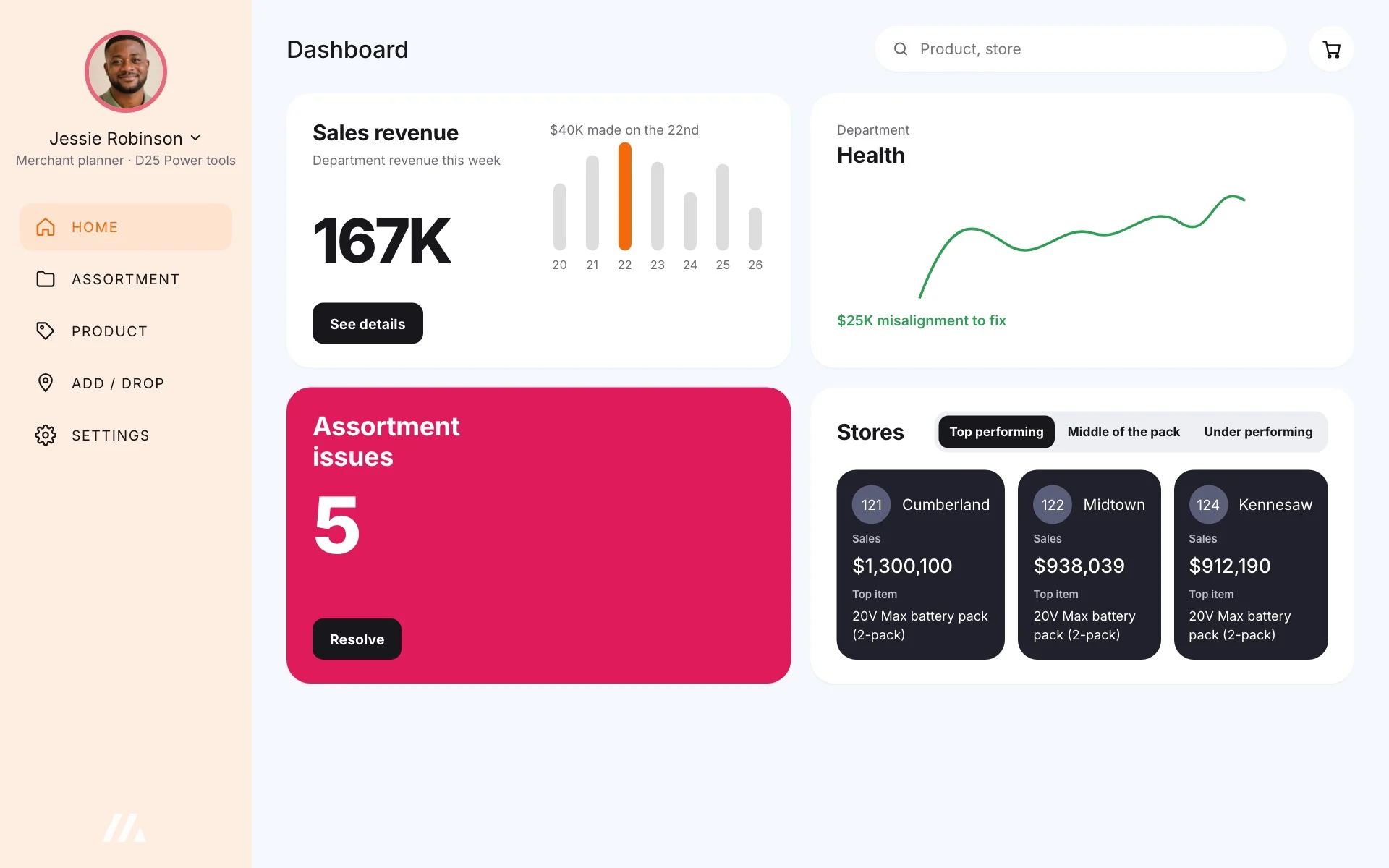
05Lead with what’s broken
The home screen opens on what needs fixing: assortment issues, misalignment in dollars and how stores are performing. Every issue goes straight to the product that needs it.
06Design with planners, not for them
Our users sat on our campus, so wireframes went through design studios with planners every week. One planner’s feedback could reshape a screen before engineering touched it.

Jeremy, Heaters and humidifiers · seasonal, assortment-driven
Jeremy’s merchant and vendor agreed on a SKU list for a wiring project. The merchant wants it in the top 500 stores, so Jeremy has to change the status of every SKU.
How he does it today
- Gets the SKUs
- Opens the key
- Adds to the 4-bay set
- Changes status in AMT 2.0
- Validates with a report
- Gets the SKUs
- Opens the key
- Drops from the 4-bay set
- Changes status in AMT 2.0
- Validates with a report
- Gets the SKUs
- Drops them in 531s or 560s
- Uploads to the data warehouse
What we heard
- Has project-heavy categories
- I do sweeping status changes weekly
- I prefer SKU and store availability, because 560s are very tedious
- I love this screen!
- This is beautiful!
- The colors help my eye take a break from all the reading.
- Photos are awesome, but not essential.
- Change status for many SKUs at once
- Check boxes to pick multiple stores
- Show on-hand inventory to help me decide
- A place to execute, if it all lives in myAssortment
- Option to update the key, or not
- Toggle list and grid views
- Its own page, linked from the dashboard
- Status changes may need a reason code
Results
-
Inventory accuracy rose from 62% to 81%
in the first six months, once planners could see what each store actually carried.
-
40,000 planner hours saved
in the first year, with fewer tools and far less back-and-forth.
-
$80M in inventory saved
by keeping quantities in line with planograms and cutting low-velocity SKUs.
How we knew: user interviews, observational studies, heuristic reviews of the old tools, surveys and analytics.
“The work you have done has been outstanding. Your effort in pulling this together helps to tell the story and showcase the value of the app to leadership. Great job!”