Wayfair
One app to open a store chain
Wayfair gave us six months to open its first physical store, with no store team, no roles and no tools. I led the associate experience from a blank page to launch, including the inventory app associates used with no training.
The problem
- 01
A store with nothing behind it
Wayfair decided to open physical stores, starting with AllModern, and gave us six months. There was no store team yet, no defined roles, and no idea what tech associates would need.
- 02
Built for turnover
Retail staff change often, so every tool had to be learnable in minutes, work on handhelds shared between people, and plug into the systems Wayfair already ran online.
| Retailer | Awareness | Consideration | Acquisition | Service | |||||||||||||||||||||
|---|---|---|---|---|---|---|---|---|---|---|---|---|---|---|---|---|---|---|---|---|---|---|---|---|---|
| Top navigation | Global banner | Home page | Footer | Landing page | Product listing | Product page | Cart | Order summary | Order confirmation | Email: received | Email: ready | Email: picked up | Email: canceled | Email: not picked up | Text: received | Text: ready | Text: picked up | Text: canceled | Text: not picked up | In-store pickup spot | Outdoor pickup spot | FAQ | Store locator | Covered | |
| Crate & Barrel | missing | missing | covered | missing | covered | covered | covered | covered | covered | covered | covered | covered | covered | covered | covered | covered | covered | covered | covered | covered | covered | covered | covered | covered | 21/24 |
| West Elm | missing | missing | missing | covered | missing | covered | covered | covered | covered | covered | covered | covered | covered | covered | covered | covered | covered | covered | covered | covered | covered | covered | covered | covered | 20/24 |
| IKEA | missing | missing | missing | missing | missing | missing | missing | covered | covered | covered | covered | covered | covered | covered | covered | covered | covered | covered | covered | covered | covered | covered | covered | covered | 17/24 |
| Target | covered | missing | missing | covered | covered | covered | covered | covered | covered | covered | covered | covered | covered | covered | covered | covered | covered | covered | covered | covered | covered | covered | covered | covered | 22/24 |
| Walmart | covered | covered | covered | covered | covered | covered | covered | covered | covered | covered | covered | covered | covered | covered | covered | covered | covered | covered | covered | covered | covered | covered | covered | covered | 24/24 |
| Best Buy | missing | missing | covered | covered | missing | covered | covered | covered | covered | covered | covered | covered | covered | covered | covered | covered | covered | missing | covered | covered | covered | covered | covered | covered | 20/24 |
| Home Depot | missing | missing | covered | missing | covered | covered | covered | covered | covered | covered | covered | covered | covered | covered | covered | covered | covered | covered | covered | covered | covered | covered | covered | covered | 21/24 |
| Nordstrom | covered | covered | covered | covered | covered | covered | covered | covered | covered | covered | covered | covered | covered | covered | covered | covered | covered | covered | covered | covered | covered | covered | covered | covered | 24/24 |
Decisions that mattered
01One app, not ten
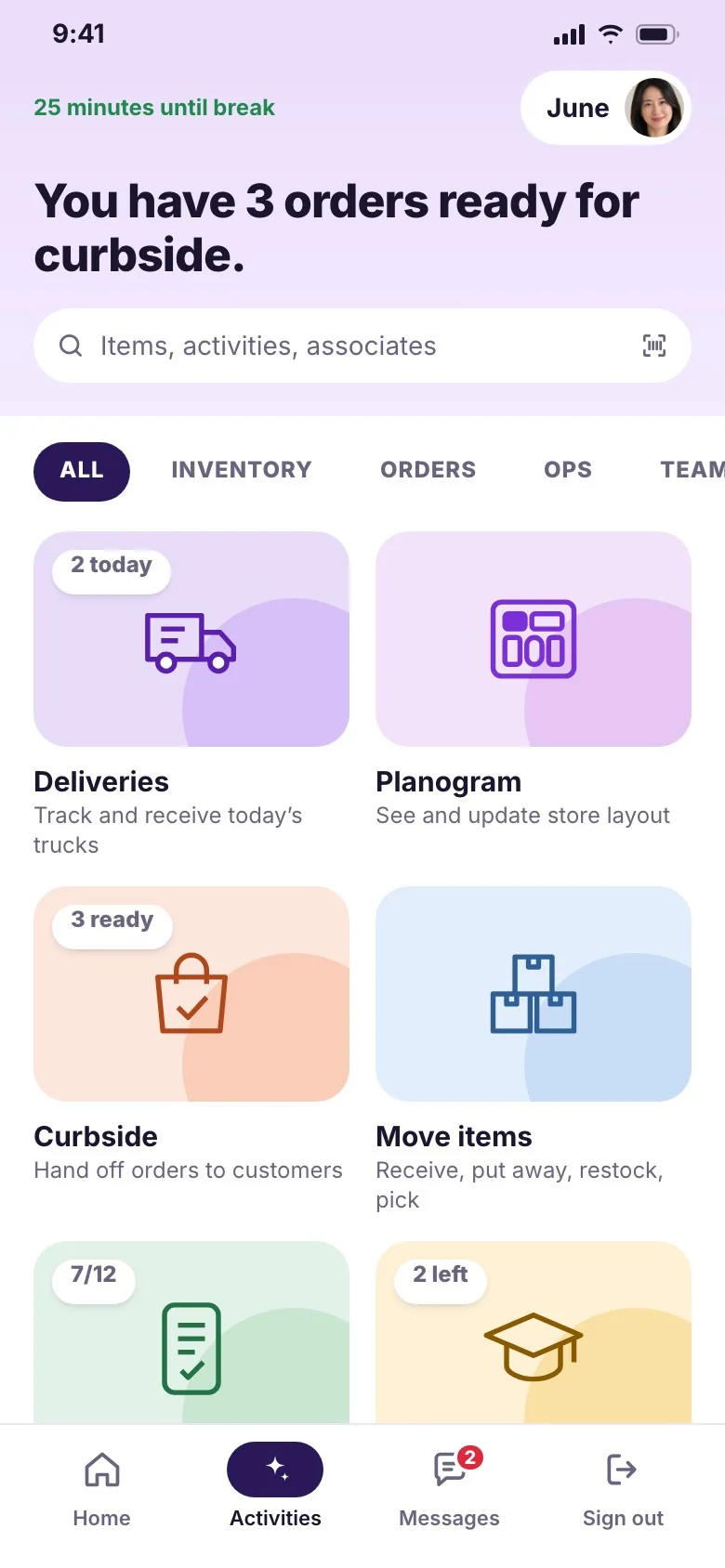
Associates were juggling a different single-purpose tool for every job. I designed one Activities hub that launches deliveries, the planogram, curbside pickup, receiving, counts and training, all built on the same patterns.
02Private on shared devices
Handhelds pass between associates all day. Signing in shows only that person’s schedule, tasks and messages, and handing off the device clears it, so nothing of yours stays behind for the next person.
03From a search to the exact bay
Managers start with who’s in, sales against goal and their to-dos. Search any product and the app shows how many are on the floor, in back and on order, then points to the bay it lives in.
04Decide what not to build
Six months wasn’t enough to build everything. We mapped Wayfair’s online workflows and split store tasks into ones that needed tech on day one and ones that could stay manual, then ran the work from one board.
In development
2- Manifest receiving Receive drop-ship inventory from couriers.
- Planogram Show where every product lives in the store, and how it’s displayed.
In design
7- Unified receiving Receive truck shipments from the fulfillment centers.
- Directed replenishment
- Returns: outbound transfers Quick, error-free transfers of returned items.
- Returns: restock in store Put returned items back on the floor fast and accurately.
- Back-of-house process map One visual of every step and where tech is needed.
- Back-of-house walkthrough prototypes Show leadership the back-of-house process.
- Case labels
Not started
3- Inventory audit 2.0 Better usability and new features.
- Activities center A prioritized launchpad for in-store activities.
- Associate home on tablet Store communications on the iPad.
Chapter 2: The first inventory count
Every new store needs an opening inventory count, then one every quarter. The first store counted on paper, and it took two days. We had until the second store opened to build something associates could pick up with no training. They scanned 5,425 items cold, hit 90.73% accuracy and finished in 63% less time.
01Every task is A to B
Receiving, putaway, restocking and pickup orders are all the same move: an item from one location to another. Designing one pattern for that move made every inventory task feel familiar.
02Scan the place, then the items
Associates scan a section label first, then items. The app tracks which sections are done, who counted them, and what’s left.
03Show the money
The count ends with a summary of discrepancies and their dollar impact, so managers know where to look first.
How we knew
- Usability tests in our retail lab
- In-store A/B tests
- Time studies
- Feature tagging
- Fulfillment center tool reviews
- Tests with store ops
Feature tagging cut the clutter
It showed which tools associates actually used, so we cut the rest.
Inventory held up
$8M counted at 96% accuracy, with almost nothing missing.
A first count with no training
5,425 items scanned at 90.73% accuracy, in 63% less time than paper.
A 4.8 associate rating
From the people using it every shift.
A team behind it
I mentored a small design team through the work.
“Thank you so much for charting the design visions and helping with the in-store inventory process. It was a hit!”